|
Availability
|
 
|
|
Availability
|
|
Availability Availability
works for both Class and Class Web options, but has particular relevance to web
bookings, where human intervention is not available to make the decision on
whether or not a booking can be accepted!
The Availability
function also allows "minimums" and "maximums" to be set, allowing for the
following type of controls:
1. 2 weeks =
minimum course booking duration The "Quantity"
available can be entered either on a cell-by-cell basis or by using the "Range
Update" option. Minimum and
maximum values can be entered in the same way. Price Items need
to be assigned so Class knows which price items are to be controlled by this
function. Please note the
filters at the top of the screen, particularly "Only List Web Items!, which will
restrict the list to only those which have been Web-enabled.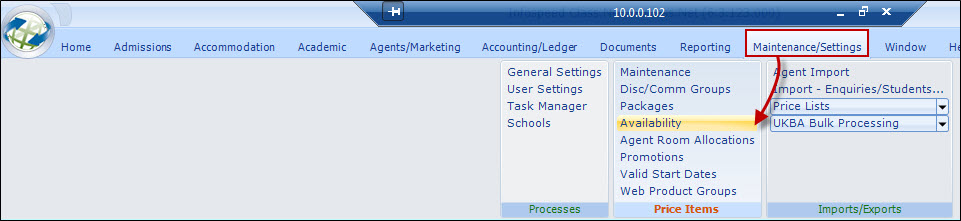
Availability enables the setting of daily/weekly limits for
a product group, so for example a "Home Stay" group (which links all the
homestay accommodation price items together) could be used to stop overbooking
occurring on particular days or weeks.
Similarly, a
residence which has finite space could have limits set to prevent
overbooking.
2. 4 weeks = maximum
course booking duration
3. Summer Course - 2 weeks min/4
week max, at start of summer, and 2 week min/4 week max for the last 2
weeks of summer. The min/max values can be adjusted on a day-by-day basis to
reflect the options available.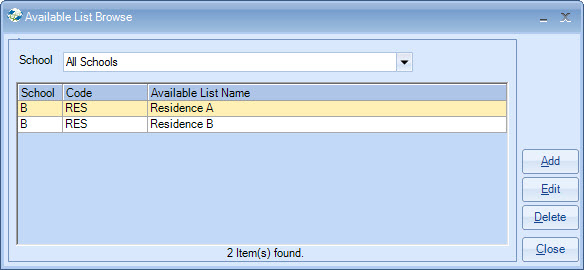
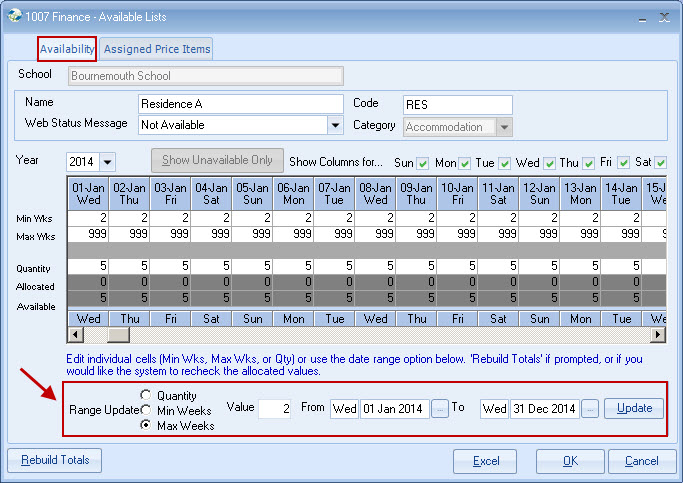
This sets the availability and may be
changed to reflect day-by-day situations.
For example, a
residence may have variable availability during the summer period.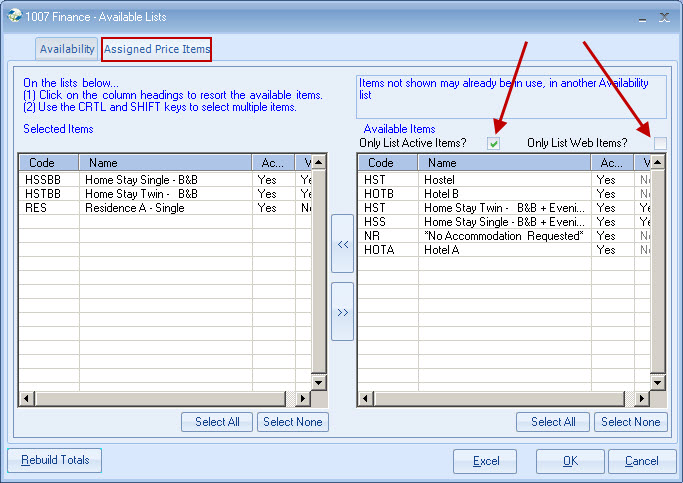
In the above example, all Home Stay price
items have been selected.
When "OK" is selected, the
"Rebuild Totals" function will automatically calculate the current position.
Class will then maintain these values automatically.
When viewing the availability, the "Rebuild" option can be
run to recheck the totals, although Class will maintain them
automatically.